

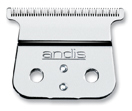
ANDIS D4D REPLACEMENTBLADE
£18.00 inc. VAT (£15.00 ex. VAT)
4 in stock
## ANDIS D4D REPLACEMENT BLADE: Uncompromised Precision for Your D-4 Trimmer
For professional barbers and stylists, as well as discerning home users who demand nothing less than perfection, the performance of your tools is paramount. The **ANDIS D4D REPLACEMENT BLADE** stands as the definitive choice for maintaining the peak operational efficiency and superior cutting capability of your cherished Andis D-4 trimmer. This isn’t just any blade; it’s an authentic, meticulously engineered component designed to restore your trimmer to its original, factory-sharp condition, ensuring every trim, line, and detail is executed with flawless precision.
Crafted from high-quality **carbon-steel**, this genuine Andis replacement blade guarantees a **dependable, long-life performance**. Carbon steel is renowned in the professional grooming industry for its exceptional hardness and ability to maintain a razor-sharp edge far longer than conventional materials. This durability translates directly into extended intervals between replacements and a consistent, clean cut that minimizes pulling or snagging, enhancing client comfort and satisfaction. The inherent properties of carbon steel also contribute to efficient heat dissipation, keeping the blade cooler during prolonged use and further prolonging its lifespan.
At the heart of its superior performance is the distinctive **close-cutting T-blade** design. Engineered for unparalleled visibility and accuracy, the T-blade is the preferred choice for a multitude of intricate grooming tasks. Whether you’re creating crisp, sharp outlines around the neckline and ears, perfecting detailed beard and mustache shaping, or delivering skin-close shaves, this blade excels. Its wider cutting surface allows for faster work in larger areas while still providing the surgical precision needed for fine detail work, making it an indispensable tool for achieving those signature, clean finishes that define professional artistry.
As the **original replacement for the Andis D-4 trimmer**, this blade ensures a seamless fit and optimal functionality. Generic alternatives often compromise on material quality, precision engineering, and compatibility, leading to suboptimal performance, reduced trimmer lifespan, and inconsistent results. Opting for the genuine ANDIS D4D REPLACEMENT BLADE means investing in the integrity of your professional equipment, guaranteeing that your D-4 trimmer will continue to deliver the consistent, high-standard performance it was designed for. Reinvigorate your trimmer and elevate your craft with a blade that’s built for endurance and engineered for excellence.
—
### How to Use & Replace Your ANDIS D4D REPLACEMENT BLADE
Maintaining your Andis D-4 trimmer with a sharp, properly installed blade is crucial for consistent performance and client satisfaction. Replacing the ANDIS D4D REPLACEMENT BLADE is a straightforward process designed for ease and efficiency.
**What You’ll Need:**
* New ANDIS D4D REPLACEMENT BLADE
* Small Phillips head screwdriver
* Cleaning brush (often included with trimmers)
* Blade oil (Andis clipper oil recommended)
* Soft cloth
**Step-by-Step Replacement Guide:**
1. **Safety First:** Ensure your Andis D-4 trimmer is **unplugged from any power source** before beginning. Safety is paramount when handling blades.
2. **Remove the Old Blade:**
* Locate the two small screws on the back of the trimmer head that secure the blade to the trimmer housing.
* Using your Phillips head screwdriver, carefully loosen and remove both screws. Keep them in a safe place.
* Gently remove the old blade assembly from the trimmer. You may need to wiggle it slightly to detach it.
3. **Clean the Trimmer Head:**
* With the old blade removed, use your cleaning brush to thoroughly brush away any accumulated hair, dust, or debris from the trimmer’s motor shaft and housing. A clean surface ensures proper blade alignment and prevents future issues.
4. **Install the New Blade:**
* Take your new ANDIS D4D REPLACEMENT BLADE. Notice the two holes on the back of the blade that align with the screw posts on the trimmer.
* Carefully position the new blade onto the trimmer head, ensuring it sits flush and properly aligned with the internal drive lever. The T-blade should extend slightly past the trimmer’s body, facing away from the housing.
* Insert the two screws back into their respective holes and gently tighten them. **Do not overtighten**, as this can strip the screws or damage the blade/housing. Tighten until snug, allowing for slight micro-adjustments if needed.
5. **Align and Adjust (if necessary):**
* Visually inspect the blade’s alignment. The top cutting blade should be slightly offset (usually 1/32″ to 1/16″) behind the bottom stationary blade to prevent skin irritation. Some trimmers have adjustment levers; for the D-4, precise screw tightening is key. Ensure it’s level and centered.
6. **Lubricate the Blade:**
* Apply a drop or two of Andis clipper oil to the teeth of the blade and along the top and bottom cutting surfaces.
* Plug in the trimmer and turn it on for a few seconds to allow the oil to distribute evenly across the blade. This reduces friction, heat, and wear, ensuring smooth operation.
* Wipe away any excess oil with a soft cloth.
7. **Test Your Trimmer:**
* Perform a quick test on a small patch of hair or a practice head to ensure the blade is cutting smoothly and efficiently without pulling.
By following these simple steps, your Andis D-4 trimmer, equipped with a fresh ANDIS D4D REPLACEMENT BLADE, will be ready to deliver precision results every time, affirming your commitment to quality and professional excellence.
You Might Also Like
-
5 Stars
-
4 Stars
-
3 Stars
-
2 Stars
-
1 Stars
Average Star Rating: 0.0 out of 5 (0 vote)
If you finish the payment today, your order will arrive within the estimated delivery time.
Reviews
There are no reviews yet.