

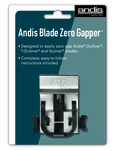


Andis Blade Zero Gapper Tool
£32.40 inc. VAT (£27.00 ex. VAT)
Out of stock
## Achieve Unrivaled Precision: The Andis Blade Zero Gapper Tool
In the world of professional grooming, precision isn’t just an advantage – it’s the foundation of a stellar reputation. Barbers and stylists constantly strive for the sharpest lines, the closest shaves, and the most immaculate fades. The secret often lies in the finer details of their tools. Introducing the **Andis Blade Zero Gapper Tool**, an indispensable accessory designed to elevate the performance of your most trusted Andis trimmers to unprecedented levels of sharpness and accuracy.
Crafted for professionals and serious grooming enthusiasts alike, this innovative tool addresses a common challenge: achieving that elusive “zero gap” without the guesswork. Zero gapping refers to the meticulous adjustment of a clipper or trimmer blade where the moving cutter blade is set as close as possible to the still blade, without actually touching. The result? A remarkably closer shave, crispier lines, and superior detailing capabilities that can differentiate a good cut from an exceptional one.
### The Power of Precision: Unlocking Your Trimmer’s Full Potential
The Andis Blade Zero Gapper Tool is engineered for one core purpose: to empower you with ultimate control over your trimming precision. Gone are the days of tedious trial-and-error adjustments. This specialized **Andis blade adjustment tool** provides a straightforward, consistent method to achieve perfect blade alignment every time.
**Key Features and Benefits:**
* **Effortless Blade Alignment:** Designed to eliminate the guesswork, this tool ensures optimal blade positioning with minimal effort. Achieve that coveted zero gap quickly and efficiently, saving you valuable time during your busy workday.
* **Achieve a Closer Shave:** By precisely positioning your blades, the Zero Gapper Tool enables your Andis trimmers to deliver incredibly close cuts. This is paramount for creating razor-sharp lineups, flawless necklines, and impeccably smooth finishes without the need for additional shaving passes.
* **Universal Andis Compatibility:** Specifically engineered to integrate seamlessly with your essential Andis equipment. This tool is purpose-designed to easily adjust Andis® Outliner®, Andis® T-Outliner®, and Andis® Styliner® blades. This targeted compatibility ensures a perfect fit and reliable adjustment for the workhorse trimmers in your arsenal.
* **Simplified Operation:** Forget complex manuals or intricate procedures. The Andis Blade Zero Gapper Tool requires only a standard screwdriver to zero gap blades. Its intuitive design means anyone can achieve professional-grade blade alignment with ease, whether you’re a seasoned barber or a home user seeking perfection.
* **Enhanced Performance & Client Satisfaction:** Sharper blades mean cleaner cuts, reduced pulling, and less irritation for your clients. Investing in precise blade adjustment translates directly into higher quality services and increased client satisfaction, fostering loyalty and repeat business.
* **Extend Blade Life:** Proper blade alignment not only improves cutting performance but can also contribute to the longevity of your blades by ensuring even wear and reducing unnecessary friction.
### Who Needs the Andis Blade Zero Gapper Tool?
This tool is an absolute must-have for:
* **Professional Barbers and Stylists:** For whom precision is non-negotiable. Elevate your fades, lineups, and detail work to a new standard of excellence.
* **Grooming Enthusiasts:** Those who demand professional-level results from their home grooming routine.
* **Anyone Using Andis Outliner, T-Outliner, or Styliner Trimmers:** If you own these iconic Andis tools, the Zero Gapper is the essential companion to unlock their full potential.
### How to Use Your Andis Blade Zero Gapper Tool:
Achieving a perfectly zero-gapped blade is simple with this user-friendly tool. Always ensure your trimmer is unplugged before performing any adjustments to prevent accidental activation and ensure safety.
1. **Safety First:** Ensure your Andis trimmer is **unplugged** from its power source before you begin.
2. **Loosen Blade Screws:** Using a standard Phillips head screwdriver, slightly loosen the two small screws that hold the trimmer blade assembly in place. Do not remove them entirely; just loosen them enough so the blade can move freely.
3. **Position the Zero Gapper Tool:** Carefully place the Andis Blade Zero Gapper Tool over the trimmer blades. The tool is designed to precisely align the cutter blade (the smaller, moving blade) with the still blade (the larger, stationary blade), setting the perfect gap. Ensure the tool is seated snugly against both blades.
4. **Adjust and Align:** While holding the Zero Gapper Tool firmly in place, gently push the still blade forward until it rests perfectly against the front edge of the Zero Gapper Tool. The tool will ensure the cutter blade is aligned just behind the still blade, establishing the ideal zero gap.
5. **Tighten Screws:** Once the blades are perfectly aligned by the tool, carefully re-tighten the blade screws. Tighten them firmly but avoid over-tightening, which can strip the screws or damage the blade assembly.
6. **Remove Tool & Test:** Remove the Andis Blade Zero Gapper Tool. Plug in your trimmer and carefully test its operation. The blades should move smoothly, and the trimmer should now deliver an exceptionally close cut with crisp, defined lines.
Invest in the Andis Blade Zero Gapper Tool today and experience the transformative difference precision can make. Elevate your craft, enhance your efficiency, and consistently deliver the sharp, clean results your clients expect. This isn’t just an accessory; it’s an investment in the unmatched quality and performance of your Andis trimmers. Order yours and redefine precision grooming.
You Might Also Like
-
5 Stars
-
4 Stars
-
3 Stars
-
2 Stars
-
1 Stars
Average Star Rating: 0.0 out of 5 (0 vote)
If you finish the payment today, your order will arrive within the estimated delivery time.
Reviews
There are no reviews yet.